Design System: The Ultimate How-To Guide for High-Speed Production
Ditch manual UI kits. Build a modern design system with AI and atomic tokens for high-speed production and instant deployment from mockup to React code.

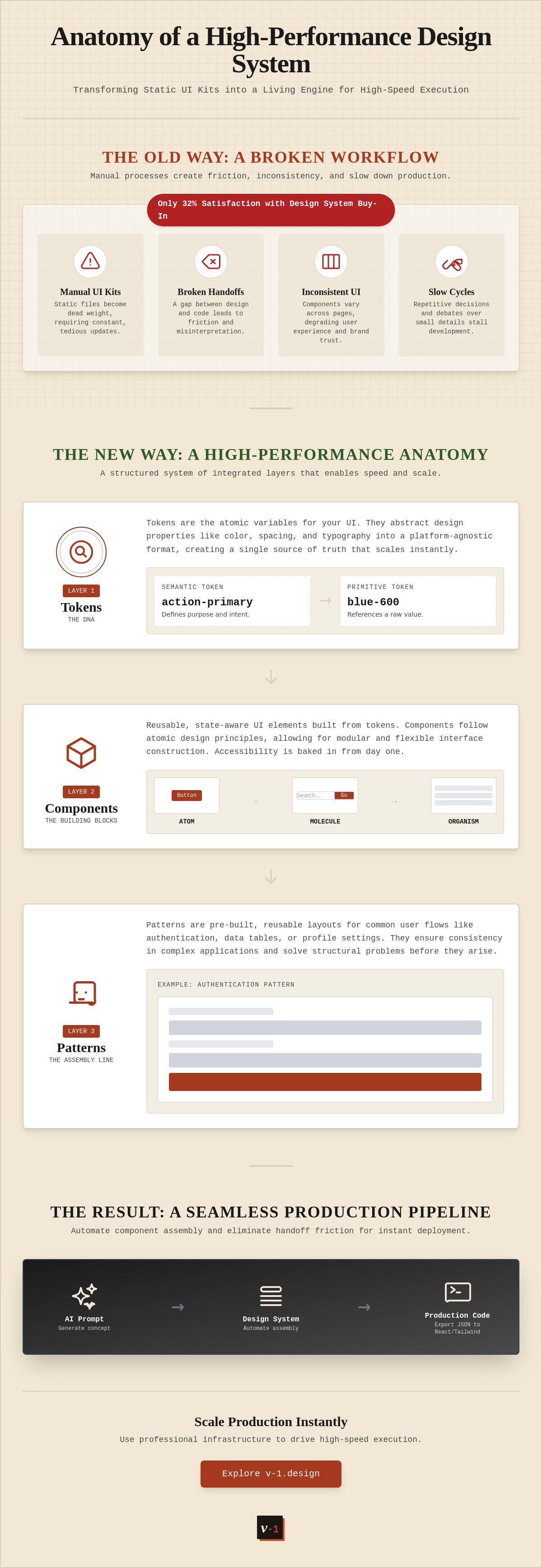
Manual UI kits are dead weight. Maintenance is a relic of a slower era. With satisfaction in design system buy-in dropping to just 32% according to zeroheight, the old way of working is clearly failing. You feel the friction every day. Handoffs are broken. UI components are inconsistent across product pages. Development cycles drag on because your source of truth is a static file rather than a living engine.
It's time to build a framework that actually moves at the speed of your vision. You need a setup that handles the heavy lifting while you focus on execution. This guide teaches you how to construct and scale a modern design system that bridges the gap between AI-generated mockups and production-ready React code. We will explore how to integrate agentic AI into your workflow, standardize tokens for interoperability, and eliminate the manual bottlenecks that stall your team. You'll learn to transform your design process into a high-performance pipeline for instant deployment.
Key Takeaways
- Define your source of truth. End manual UI kit maintenance and eliminate repetitive decision-making.
- Build a high-performance design system using atomic tokens to control spacing, color, and typography.
- Leverage AI prompts. Automate component assembly to move from concept to production in seconds.
- Eliminate handoff friction. Export JSON tokens directly into React or Tailwind codebases for instant deployment.
- Scale production instantly. Use professional infrastructure like the Maker Plan to drive high-speed execution.
What is a Design System? Defining Your Source of Truth
A design system is the underlying infrastructure for scalable UI. It isn't just a collection of buttons. It's a living ecosystem of tokens, components, and rigorous standards. For makers and studios, this framework eliminates repetitive decision-making. You stop debating border radii. You start shipping features. Understanding What is a Design System? requires looking past the visual layer to the logic beneath. It's the bridge between creative vision and production-ready code.
A simple UI kit is a parts bin. A design system is the assembly line. While a UI kit provides static assets for mockups, a system provides the rules for how those assets behave across every platform. It ensures that a change in a primary brand color propagates instantly to web, mobile, and internal tools without manual intervention. This is the difference between a library and an engine. You don't just use it; you build with it.
The Core Purpose: Efficiency at Scale
Speed is the primary metric for modern product teams. If you aren't moving fast, you're falling behind. A high-performance system reduces the friction between the initial prompt and the final interface. It allows you to move from an AI-generated concept to a functional layout in minutes. Consistency becomes an inevitable byproduct of the workflow rather than a chore to be managed. Whether you're building for web or mobile, the output remains identical. You achieve total control with zero wasted motion. You focus on the vision while the system handles the alignment.
Source of Truth vs. Static Assets
PDF style guides are obsolete. In 2026, static documentation is a liability. It creates a gap between what is designed and what is deployed. High-speed design workflows require fluid, code-aligned systems. Every component in your design tool must map directly to a component in your codebase. This creates a single source of truth that stays synchronized automatically. Documentation isn't a separate task; it's a functional part of the assembly. You don't read the manual. You use the tool. The result is a seamless transition from mockup to React code, powered by a technical workflow that respects your time and intelligence.
Tokens are the DNA. They define atomic properties like spacing, typography, and color. By centralizing these values, you create a design system that scales without breaking. When you update a token, the entire product updates. This level of automation is essential for studios managing multiple projects. It allows you to maintain professional standards without the overhead of manual oversight. You build once. You deploy everywhere. The technology handles the heavy lifting in the background.
The Anatomy of a High-Performance Design System
Structure creates speed. A high-performance design system consists of four integrated layers. Tokens. Components. Patterns. Documentation. This is the anatomy of execution. It transforms a scattered UI into a precise machine. It ensures that every decision made at the atomic level scales across the entire product ecosystem instantly.
Design Tokens: The Variable Layer
Tokens are the foundation. They translate design intent into platform-agnostic data. Stop hardcoding hex values. Use primitive tokens for raw colors and spacing. Use semantic tokens to define purpose. action-primary is better than blue-600. This distinction allows for instant global updates. You change the token. The entire interface follows. For those looking to accelerate this setup, standardizing your token architecture is the first step toward automation. It removes the guesswork from styling and ensures your values remain consistent across every platform.
Components: The Building Blocks
Components are the building blocks of your interface. They are pre-built and reusable. Follow atomic design principles to maintain order. Build atoms like buttons and inputs first. Combine them into molecules like search fields. Assemble those into organisms like navigation bars. This modular approach ensures total flexibility. Every component needs variants and states. Hover. Focus. Active. Disabled. High-performance systems like the United States Web Design System (USWDS) demonstrate that accessibility must be baked into these blocks from day one. It isn't a feature. It's a standard for professional production.
Pattern Library: Reusable Layouts
Pattern libraries store reusable layouts for common user flows. Authentication. Data tables. Profile settings. You don't design these from scratch every time. You deploy them. This layer ensures consistency across complex applications. It reduces cognitive load for the user and the maker. Patterns allow you to focus on unique features while the system handles the standard interactions. You move faster because the structural problems are already solved.
Documentation: The Rules of Engagement
Documentation provides the rules of engagement. It isn't a static manual. It's the technical contract between design and engineering. It defines how components behave. It explains when to use specific patterns. High-speed production requires clear, accessible documentation that lives alongside the code. When everyone knows the rules, friction disappears. The design system becomes a self-serve engine for growth. You empower your team to build with confidence and speed.
How to Build Your Design System Using AI (Step-by-Step)
Manual creation is a bottleneck. In 2026, building a design system without AI is a strategic error. You don't draw buttons anymore. You orchestrate them. This workflow replaces weeks of tedious work with minutes of high-speed generation. It moves the focus from manual labor to architectural oversight. You are the pilot. AI is the engine.
Prompting the Foundation
Start at the atomic level. Use generative AI prompts to define your core brand tokens. Feed the model your brand identity. It generates color palettes, typography scales, and spacing grids instantly. AI eliminates the blank canvas problem by providing a functional starting point based on proven design principles. It also ensures contrast ratios meet WCAG standards automatically. You don't guess. You validate. This data-driven foundation ensures your system is accessible and professional from the first second.
Automated UI Kit Generation
Once tokens are set, move to assembly. Use automated UI kit generation for rapid component assembly. You don't create hover, active, or disabled states manually. AI generates these variants in seconds. It scales a single button concept into a full form library. This process is the backbone of rapid prototyping. It allows you to test functional interfaces while others are still sketching layouts. Speed is your competitive advantage.
Step 3 involves mapping AI-generated mockups to your existing system components. This bridge ensures that creative exploration remains tethered to technical reality. You can generate a landing page mockup and instantly replace generic placeholders with your production-ready organisms. This keeps the workflow clean. It prevents the design debt that occurs when mockups ignore the system. This Case study on building a large-scale design system highlights how critical this alignment is for long-term success. Even at a massive scale, the system must remain the single source of truth.
Step 4 is documentation. Use LLMs to write the rules of engagement. Feed the model your component code. It generates usage guidelines, accessibility notes, and implementation details for instant clarity. You don't write manuals. You generate them. Finally, validate and iterate. Use high-speed feedback loops to refine components based on real-world usage. The design system isn't finished. It evolves. AI makes that evolution effortless.
Bridging the Gap: From Design System to Production Code
Manual handoff is a liability. It kills momentum. In a high-speed production environment, your design system must speak the language of the machine. You don't hand off files. You deploy code. Bridging the gap between a visual library and a production-ready codebase requires a total elimination of manual friction. Exporting tokens as JSON for direct use in React or Tailwind ensures your production environment stays in sync with your design intent. This process removes the human error inherent in traditional handoffs.
The Design-to-Code Workflow
Efficiency requires automation. You can use AI to translate visual components into clean, maintainable React code instantly. This isn't just about generating snippets. It's about maintaining code quality and architectural integrity across automated exports. Integrating an AI design to code workflow allows studios to move from mockup to deployment without the typical technical debt. Version control is the final piece of the puzzle. Syncing your design environment and GitHub seamlessly ensures that every design iteration is tracked, validated, and ready for production. Your system becomes a continuous delivery pipeline.
Scaling with AI Studio Credits
Growth shouldn't require a linear increase in headcount. You need flexible processing power to handle complex system iterations. Using AI Studio Credits allows you to power advanced generative design tasks on demand. You can scale your design output to match the speed of your development cycle without bloating your team. Whether you're generating thousands of component variants or iterating on complex layouts, these credits provide the engine for high-speed production. You maintain total control while the technology handles the heavy lifting in the background.
The gap between AI mockups and production code is closing. Traditional methods rely on static documentation and manual updates. Modern systems use automated bridges to ensure every pixel maps to a functional line of code. This is how you build at scale. You eliminate the wait times. You remove the guesswork. Your team focuses on the product vision while the infrastructure handles the implementation. Bridge the gap and start building at the speed of thought. Scale your production with a professional design system today.
Design Infrastructure for Professionals: v-1.design
Production speed is a choice. Fight the tools or let the tools drive the result. v-1.design provides the engine for high-speed UI production. It's built for those who prize execution over theory. A modern design system is more than a library; it's a high-performance pipeline. This platform removes the friction from maintenance. It ensures your source of truth remains functional and fast. You stay in control while the technology handles the heavy lifting. Zero friction. Absolute efficiency. Modern confidence. It's the infrastructure for those who refuse to wait.
Choosing Your Subscription Level
Select the power level that matches your output. The Maker Subscription serves technical founders and solo creators. Rapid prototyping becomes the default. You move from concept to code without a team. Lean efficiency defines this tier. The Studio Subscription offers advanced tools for professional design teams. Structural integrity is the focus here. High-growth tech circles rely on this setup to scale complex products across multiple platforms. For massive scale, the Agency Subscription delivers the necessary infrastructure. Volume is no longer a bottleneck. Throughput remains high without compromising quality. Speed is the constant. You choose the scale; we provide the momentum.
The Future of Design Systems
AI is not a replacement. It is the accelerator. The innovators of 2026 recognize that manual labor is a relic. They use agentic AI to orchestrate the entire design-to-code pipeline. This shift allows you to move at the speed of thought. You are no longer limited by manual UI kit maintenance or broken handoffs. You are empowered by a silent, powerful engine that enables your vision without getting in the way. This is not about holding hands. It's about high-speed tools for those who want results. You build. You deploy. You win.
The technology works in the background. It feels effortless because the friction has been engineered out. Join the ranks of high-performance teams who have eliminated the gap between design and deployment. A design system shouldn't be a burden. It should be your greatest competitive advantage. Stop managing files and start shipping products. Build your high-speed UI with v-1.design.
Execute at the Speed of Thought
Static assets are a liability. Your design system must be a high-performance engine. Not a dusty archive. We have mapped the transition from atomic tokens to automated production. You now have the blueprint to bridge the gap between AI mockups and production-ready code. Manual maintenance is over. Frictionless execution is the new standard.
Infrastructure defines your output. v-1.design provides the generative UI infrastructure for 2026. Deploy AI-powered design-to-code workflows. Eliminate the handoff bottleneck. Choose the Maker, Studio, or Agency plan to match your scale. You stay in total control. The technology handles the heavy lifting in the background. It's time to stop managing files. Start shipping products. The tools are ready. The vision is yours.
Start Building with v-1.design
Move fast. Build better. Your vision is now immediate.
Frequently Asked Questions
What is the difference between a UI kit and a design system?
A UI kit is a static collection of visual assets. A design system is a functional engine. Kits provide the parts; systems provide the assembly line and the rules. One is a library for mockups. The other is a source of truth for production. Transitioning to a system eliminates manual handoffs and ensures code alignment. It is the difference between drawing and deploying.
How does AI help in building a design system?
AI accelerates the structural setup. It generates core tokens and component variants from simple prompts. You don't sketch hover states manually. You orchestrate them. AI Studio Credits enable these generative workflows. It removes the blank canvas problem. You move from vision to production-ready components in seconds. The technology handles the repetitive labor. You focus on the architecture.
Can I use a design system for a small project?
Every project benefits from a source of truth. Small projects scale faster with a design system. It prevents the accumulation of design debt. Starting with a Maker Subscription provides a lean foundation for solo creators. Consistency is baked in from day one. You save time by not reinventing buttons for every new page. Efficiency is a universal requirement.
How do I keep my design system in sync with my code?
Export tokens as JSON for direct use in your codebase. Sync your design tools with version control systems like GitHub. This creates a continuous delivery pipeline. When you update a variable in the system, the change propagates to production automatically. No manual intervention is required. You eliminate the handoff bottleneck. The design and the code remain identical at all times.
What are design tokens and why do I need them?
Tokens are the DNA of your interface. They store atomic properties like spacing and hex codes as platform-agnostic variables. You need them to maintain global control. Change a token once. Update every platform instantly. They translate design intent into technical data. This ensures your product remains consistent across web and mobile platforms without the need for manual oversight.
Is it expensive to maintain a design system?
Manual maintenance is a resource drain. AI-powered systems solve this crisis by automating documentation and component updates. The cost of inconsistency is always higher than the cost of a system. Using professional infrastructure like the Studio Subscription reduces the headcount needed for maintenance. You achieve high-speed production without the traditional overhead. Efficiency is the ultimate cost-saver in modern development.
How do AI Studio Credits work in the design process?
AI Studio Credits act as the fuel for generative tasks. They provide on-demand processing power for complex system iterations. Use them to generate custom UI kits or automate documentation. They allow you to scale your output without increasing your team size. You spend credits on execution. The system delivers the result. It is a high-performance model designed for modern makers and agencies.
Can a design system improve my development speed?
A system dramatically increases development velocity. Developers stop coding individual elements. They assemble pre-built, production-ready components instead. This eliminates decision fatigue and repetitive work. Development cycles become shorter. Handoff friction disappears. You ship features faster because the structural problems are already solved. Speed becomes an inevitable fact of your technical workflow.
