Best AI App Builder: 7 Workflows Compared (2026)
There's no single best AI app builder — there are seven documented workflows. Compare v0, Lovable, Bolt, Replit, Cursor, Builder.io Fusion, and v-1.design.
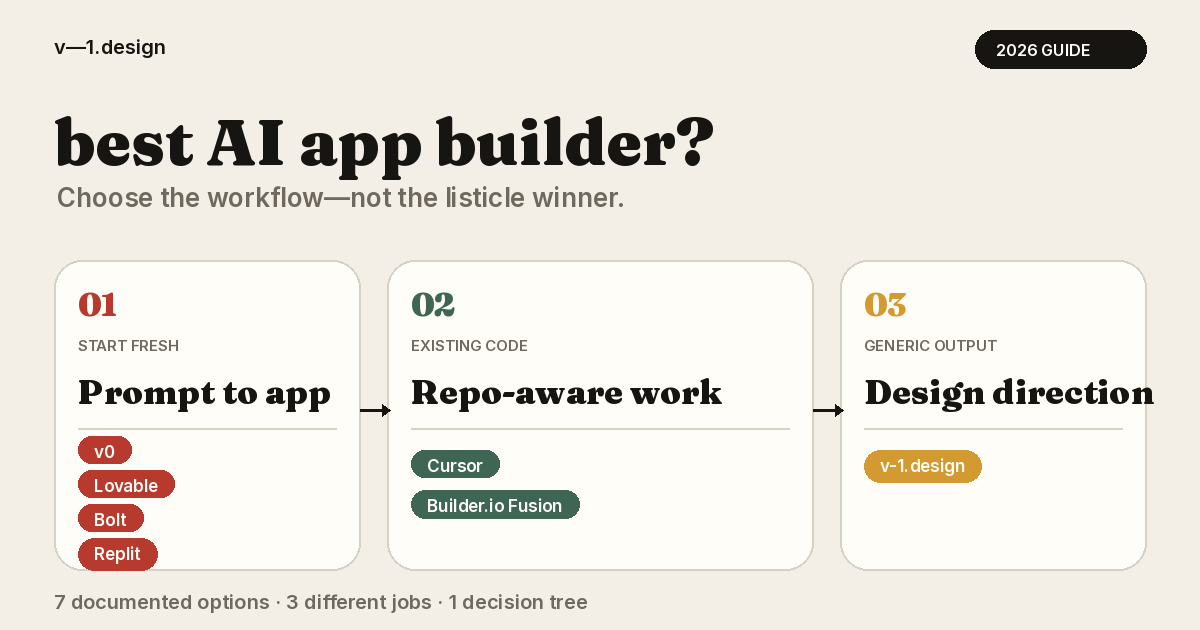
Most best-AI-app-builder comparisons use ranked lists and pricing tables. This guide takes a different approach: "best" can describe three jobs, and the right shortlist depends on which one you need.
This guide compares seven documented workflows against those jobs: v0 as the baseline; Lovable, Bolt, and Replit as other full-stack prompt-to-app builders; Cursor for repo-aware coding; Builder.io Fusion for repo-aware visual development; and v-1.design as a design-direction source. Every comparison comes from first-party documentation rather than standardized hands-on tests. There's no single winner here. There's a decision tree.
Key Takeaways
- "Best AI app builder" hides three distinct jobs: prompt-to-app building, repo-aware coding, and sourcing a design direction. Name your job before you compare tools.
- v0, Lovable, Bolt, and Replit are the actual full-stack builders — prompt in, working app out, with documented backend and deployment stories.
- Cursor, Builder.io Fusion, and v-1.design are adjacent workflow categories, not full-stack builders: repo-aware coding, repo-aware visual development, and design sourcing.
- If generic output persists, test the design brief before migrating. A more specific brief can improve the input to any builder, although tool capabilities still differ.
- v-1.design supplies finished design directions plus the prompts to rebuild them in whichever builder or coding agent you pick.
The three jobs hiding inside "best AI app builder"
Vercel's v0 documentation describes it as an AI agent that generates real code and builds full-stack apps and agents. That's the bundle the whole category gets measured against: prompt in, working code out, with a path to owning what you shipped.
The search can describe one of three different jobs.
Job one: prompt-to-app building. You want to describe an app and get scaffolded UI, backend, and deployment. v0, Lovable, Bolt, and Replit compete here directly, differing mainly in backend defaults, mobile targets, and hosting stories.
Job two: repo-aware coding. Your app already exists. In the first-party documentation reviewed, Cursor and Builder.io Fusion provide the clearest existing-codebase workflows. Verify repository-import support and limitations directly with each vendor before choosing.
Job three: design direction. The builder works, but the output looks generic. We've written about why AI-built apps look the same; the short version is that a vague brief can contribute to familiar visual defaults.
Separating these jobs avoids comparing products that solve different problems.
Seven AI app-building workflows at a glance
How this comparison was researched: We reviewed first-party documentation retrieved July 15, 2026. We did not run standardized hands-on tests or verify reliability, support quality, usage limits, or total cost. The recommendations describe documented workflow fit, not measured product performance.
| Tool | Workflow category | What its own docs emphasize | Reach for it when |
|---|---|---|---|
| v0 | Full-stack prompt-to-app builder (the baseline) | AI agent for real code and full-stack apps; GitHub integration and local code export | Its prompt-to-app workflow already fits how you build |
| Lovable | Full-stack prompt-to-app builder | Supabase integration tutorials covering authentication and database management | You want prompt-to-app with a documented Supabase backend path |
| Bolt | Full-stack prompt-to-app builder | Full-stack web apps on JavaScript frameworks; Expo integration for mobile | You want web and mobile from the same prompt-driven workflow |
| Replit | Full-stack prompt-to-app builder | Agent builds from plain-language descriptions; auth, database, design, and deployment in one place | You want to describe, build, and ship without leaving one environment |
| Cursor | Repo-aware coding agent (adjacent category) | Agent, Rules, Skills, MCP, and a CLI; edits files, searches the codebase, runs commands | The app already exists and you work in an editor |
| Builder.io Fusion | Repo-aware visual development (adjacent category) | Repo, component, and rule context; prompt-to-build; visual code editing; Figma design-to-code | Design and engineering collaborate on an existing codebase |
| v-1.design | Design-direction source (adjacent category, not a builder) | Library of finished design directions with builder-ready prompts and a documented library guide | The build works but the output looks generic |
The full-stack builders: v0, Lovable, Bolt, and Replit
These four do the job most people mean by "AI app builder": describe an app, get working full-stack code. For per-tool implementation walkthroughs, our AI builder guides cover each of them in depth.
v0
v0 is the baseline the category measures itself against — and staying put is a legitimate answer. Beyond the code generation covered above, the official v0 FAQ addresses GitHub integration and exporting code to edit locally: the ownership path that keeps a project from living and dying inside the tool.
Weighing a move away from v0 specifically? That's a different comparison than a category ranking — our dedicated v0 alternatives breakdown covers the switch-away decision on its own.
Lovable
A prominent part of Lovable's documentation is its Supabase path. Its first-party tutorials cover connecting Supabase, authentication, and database management.
If you pick Lovable, prompt structure decides more than tool choice does. Our guide to Lovable design prompts covers how to write prompts that carry an actual design direction into the tool.
Bolt
Bolt's official documentation describes building full-stack web apps with JavaScript frameworks, plus an Expo integration for mobile. Its product page positions backend infrastructure, hosting, databases, and integrations as part of the package.
Replit
Replit's Agent documentation describes building apps from plain-language descriptions, and its product page bundles auth, database, design, and deployment into one environment. It's the everything-in-one-tab option: describe, build, and ship without leaving the browser.
Adjacent category one: repo-aware tools
If your real constraint is "works with the code I already have," stop shopping for builders. Cursor and Builder.io Fusion aren't full-stack app builders — they're an adjacent workflow category with different mechanics, and it's the category many "best AI app builder" searches actually need.
Cursor
Cursor's documentation covers an Agent that works inside your editor, Rules for encoding project conventions, Skills, MCP support, and a CLI. The company's own agent best-practices guide describes the working loop: the agent edits files, searches the codebase, and executes terminal commands.
Its docs emphasize an agent working in your editor, codebase, and terminal — not a hosted prompt-to-app pipeline. That's the distinction that matters for job two.
Builder.io Fusion
Builder.io's Fusion page describes prompt-to-build with repo, component, and rule context, plus visual code editing on top. The company's design-to-code page adds a Figma-to-code path with codebase integration.
Fusion sits between design and engineering: a designer can work visually while the output stays connected to the real repo and its components. If your team's friction is "designers mock it, engineers rebuild it," this is the category to evaluate — not another prompt-to-app builder.
Adjacent category two: design direction
One reason a builder switch can disappoint is that the prompt and design brief stay unchanged. A more specific brief may improve the input without a migration, although tool capabilities and output quality still differ.
That's the gap v-1.design covers — and it's worth being precise about what it is not. It is not a full-stack app builder and doesn't compete with the tools above on scaffolding, backends, or hosting. It's a design-source layer: a library of finished app and website design directions, each with the exact prompts and workflow to rebuild or adapt it in the tool you already use — v0, Lovable, Bolt, Replit, Cursor, Claude Code, or Codex.
So v-1.design earns its slot in a best-AI-app-builder comparison in the third sense only: as the design input, not the builder. If v0's workflow suits your build, keep v0 and change what you feed it. If you're moving to Lovable or Bolt anyway, the same design directions travel with you, because the layer is tool-agnostic by design.
How to choose: rubric, decision tree, and workflow
Three instruments, in the order you should use them: score what you have, pick where you'll build, then prompt so the output stops looking rented.
A six-point rubric for judging AI design output
Before blaming a tool — or migrating to a new one — score what it actually gave you. Rate each criterion from 0 (absent) to 2 (solid).
- Product specificity. Does the UI speak your product's language — its real objects, verbs, and flows — or is it placeholder furniture: stat cards, a generic table, a settings page that could belong to any SaaS?
- Visual direction. Is there a recognizable point of view in type, color, and spacing, or did the tool fall back on defaults? For calibration on what a deliberate direction looks like, browse these AI app design examples.
- Route and state coverage. Are empty, loading, and error states designed? Secondary routes? Or just one hero screen and a happy path?
- Code ownership. Can you export the code, edit it locally, and keep working in your own repo — or does the work live inside the tool?
- Backend needs. Does the tool's documented backend story — authentication, database, and integrations — match what your app requires, or will you wire that up elsewhere?
- Collaboration model. Is this a solo prompting loop, or can design and engineering both touch the result?
Read the score in two halves. Low scores on criteria one through three suggest testing the design input first. Low scores on four through six suggest evaluating a different tool category.
The decision tree
Work through it in order and stop at the first branch that fires.
- Does the codebase already exist?
- Yes, and designers need to work in it visually → evaluate Builder.io Fusion.
- Yes, and it's engineer-driven agent work → compare Cursor.
- Starting fresh — do you need iOS and Android from the same effort?
- Yes → shortlist Bolt, on the strength of its documented Expo path.
- Do you want authentication and database management through Supabase, with first-party guides to follow?
- Yes → evaluate Lovable.
- Do you want to describe, build, and host in one environment?
- Yes → evaluate Replit.
- Already building in v0, and it's working?
- Keep v0. A listicle is not a reason to migrate.
- At any branch: does the output look generic?
- Fix the design layer first — pick a direction, then feed it to whichever tool the tree just handed you.
A prompt workflow for more specific output
Whichever branch you landed on, use this as a diagnostic workflow rather than a guarantee.
1. Choose the direction before opening the builder. Name the typography, the color logic, the density, the layout structure. Pull it from a design library, a moodboard, or an app you admire — the source matters less than the specificity.
2. Write the design half of the prompt as constraints, not adjectives. Adjectives such as "modern and clean" leave major design decisions unspecified; constraints are clearer:
Build a booking dashboard for a physio clinic.
Design direction: warm neutral base (#F7F4EF) with one accent (#C2410C).
Type: Fraunces for display, Inter for UI text.
Layout: 12-column grid, sidebar nav with icon + label, generous whitespace.
Components: cards with 1px borders, no drop shadows.
Cover these states: empty (no bookings yet), loading, error, and a fully booked week.
3. Rebuild one screen, then iterate. Get the direction holding on a single screen before generating ten. If you'd rather start from a finished direction than assemble one from scratch, the library guide documents the full path from design source to running app.
Frequently asked questions
What is the best AI app builder?
There isn't a single one. v0, Lovable, Bolt, and Replit compete for the full-stack prompt-to-app job — pick by backend, platform, and hosting fit. If your code already exists, you want a repo-aware tool such as Cursor or Builder.io Fusion instead. And if the build works but the output looks generic, the fix is a design-direction source, not another builder.
Is Lovable or Bolt better than v0?
They compete for the same prompt-to-app job, so it comes down to documented fit rather than a ranking. Lovable's first-party tutorials emphasize connecting Supabase, authentication, and database management. Bolt's docs emphasize full-stack JavaScript web apps plus an Expo integration for mobile. Match those against your backend and platform needs.
Is v-1.design an AI app builder?
No. v-1.design is a design-source layer: a library of finished design directions with builder-ready prompts. It supplies the direction, and a builder or coding agent — v0, Lovable, Bolt, Replit, Cursor — does the building. You pick a direction first, then prompt your tool with it.
Which AI app builder works with an existing codebase?
For an existing codebase, Cursor and Builder.io Fusion have the clearest first-party emphasis on repo-aware work. Cursor documents an editor-native agent that edits files, searches the codebase, and runs terminal commands. Builder.io Fusion documents repo, component, and rule context with visual code editing.
Why does my AI-generated app look generic no matter which builder I use?
A generic design brief can contribute to generic output. Specify typography, color, spacing, product language, routes, and interface states, then compare the result. Tool choice may still matter, so treat this as a diagnostic step rather than a guarantee.
If the rubric points to an underspecified design direction, test that input before migrating. The v-1.design library provides finished app and website directions with prompts for rebuilding them in a selected builder or coding agent.
Sources
All sources retrieved 2026-07-15.
- Vercel, "v0 Docs"
- Vercel, "v0 FAQ"
- Vercel, v0 product page
- Lovable, Supabase integration tutorials
- Lovable, "Best AI App Builders" (first-party comparison)
- Bolt, "Intro to Bolt" (official documentation)
- Bolt, product page
- Replit, "Replit Agent overview"
- Replit, product page
- Cursor, "Cursor Docs"
- Cursor, "Agent best practices"
- Builder.io, "Fusion"
- Builder.io, "Design to Code"
- v-1.design, "Library" (first-party product source)
- v-1.design, "How to use Library design prompts" (first-party product source)
- v-1.design, "AI builder design prompt guides" (first-party product source)